



What Is a Google Ads Bid?
A Google Ads bid is the maximum amount you’re willing to pay for a particular action, like a click, a thousand ad impressions, or a video view. This number is your upper spending limit in the ad auction, not necessarily the exact price you’ll pay. In most cases, you’ll end up paying less than your maximum bid, depending on competition and ad quality.
Bidding is at the core of Google Ads because it determines whether your ad is shown and where it appears. The system balances your bid with other factors, such as the quality of your ad and the user’s context, to decide if it’s worth displaying your ad to that person at that moment.
How Google Ads Bidding Works
Google Ads uses a real-time auction process that happens whenever a user searches on Google or visits a website within its ad network. The moment this happens, Google compares all the advertisers competing for that ad slot. Your bid amount is only one factor; Google also considers the quality and relevance of your ad and the likelihood of engagement.
This means a smaller advertiser with a lower bid can still outrank a bigger competitor if their ad is highly relevant and offers a better user experience. For example, a well-optimized ad with a strong click-through rate and relevant keywords could cost less per click while still appearing above more expensive, less relevant ads.
What Are the Three Components of Google Ads Auction Rankings
Bid Amount – This is your maximum willingness to pay for a click, impression, or view. It sets your baseline in the auction.
Ad Quality – Measured through factors like expected click-through rate, ad relevance, and landing page experience. Higher quality can lower your costs.
Expected Impact of Ad Assets – Extensions like sitelinks, call buttons, location info, and images can increase ad visibility and engagement, boosting your rank.
Together, these three elements create your Ad Rank, which determines both the position of your ad and whether it appears at all.
What Are the Types of Google Ads Bid Strategies
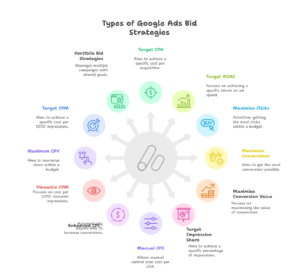
Google Ads offers different bidding strategies to match different goals. Some are manual, where you control each bid, while others are automated, letting Google adjust bids based on real-time data.
If your goal is to increase conversions, you might use Target CPA or Maximize Conversions. For revenue optimization, Target ROAS or Maximize Conversion Value could be better. To gain traffic, you might choose Maximize Clicks, and for visibility, Target Impression Share. There are also brand-awareness-focused options like Viewable CPM and Target CPM, plus specialized tools like Portfolio Bid Strategies for managing multiple campaigns.
1. Target CPA
Target CPA (Cost Per Acquisition) aims to get as many conversions as possible at your chosen average cost per conversion.
How Target CPA Works
You set a desired CPA — for example, $20 per lead. Google then automatically adjusts bids in each auction to try to meet this goal. It may bid higher when it predicts a higher likelihood of conversion and lower when the chances are smaller.
| Pros | Cons |
| Saves time with automation | Less control over individual keyword bids |
| Good for consistent CPA goals | Requires sufficient conversion history |
2. Target ROAS
Target ROAS (Return on Ad Spend) focuses on maximizing revenue rather than the number of conversions.
How Target ROAS Works
You set a percentage for your desired return — for example, 500%. Google adjusts bids so that, on average, you earn $5 for every $1 spent. It prioritizes auctions where higher-value conversions are likely.
| Pros | Cons |
| Optimizes for revenue, not just clicks | Needs accurate conversion value tracking |
| Great for e-commerce and sales-driven campaigns | Requires enough data to make accurate predictions |
3. Maximize Clicks
This strategy aims to get the highest possible number of clicks within your budget.
How Maximize Clicks Works
Google automatically adjusts bids to drive traffic. You can set a maximum CPC limit to control costs.
| Pros | Cons |
| Increases website traffic quickly | Clicks may not lead to conversions |
| Helps test ads, landing pages, or audiences | Can attract unqualified traffic (low-quality leads) |
| Useful when brand awareness is the goal | Limited control over which clicks are prioritized |
| Easy campaign setup and management | ROI may be low if conversions aren’t tracked |
4. Maximize Conversions
This strategy focuses on getting as many conversions as possible within your budget.
How Maximize Conversions Works
Google uses historical conversion data and real-time signals to adjust bids for each auction.
| Pros | Cons |
| Optimized specifically for business results (sales, leads, sign-ups) | Requires accurate conversion tracking and enough historical data |
| Better return on ad spend compared to just clicks | Can limit reach if your budget is small or the data is insufficient |
| Adjusts bids in real time based on user intent signals | Less control over individual CPC bids |
| Works well if you already have solid conversion tracking | Performance may take time to stabilize (learning phase) |
5. Maximize Conversion Value
This strategy focuses on maximizing total revenue from conversions.
How Maximize Conversion Value Works
Bids are adjusted to target high-value transactions, not just the number of conversions.
| Pros | Cons |
| Ideal for revenue-focused goals | Requires accurate value tracking |
| Works well for e-commerce | Needs enough data to optimize effectively |
6. Target Impression Share
This strategy ensures your ads appear in a specific share of eligible impressions.
How Target Impression Share Works
You choose your desired position (anywhere, top, or absolute top) and the percentage of eligible impressions you want to win.
| Pros | Cons |
| Increases visibility | It may be costly without conversions |
| Good for brand awareness | Less focus on ROI |
7. Manual Cost-Per-Click (CPC)
Let’s you control exactly how much you bid for each click.
How Manual CPC Works
You set bids for each keyword or ad group manually, adjusting based on performance.
| Pros | Cons |
| Full control over bids | Time-consuming |
| Can prioritize high-performing keywords | Requires constant monitoring |
8. Enhanced Cost-Per-Click (ECPC)
A hybrid between manual bidding and automation.
How ECPC Works
You set manual bids, and Google can raise or lower them based on the likelihood of conversion.
| Pros | Cons |
| Combines manual control with automation | May still overspend if not monitored |
| Can improve conversion rate | Needs conversion tracking enabled |
9. Viewable CPM (Cost Per 1,000 Impressions)
Focused on paying only for impressions that are actually viewable.
How Viewable CPM Works
You’re charged only when 50% of your ad is visible on screen for at least one second (two for video).
| Pros | Cons |
| Good for brand visibility | Not focused on clicks or conversions |
| Ensures real visibility | Limited to display campaigns |
10. Maximum CPV (Cost-Per-View)
Used for YouTube campaigns.
How Maximum CPV Works
You pay when someone watches at least 30 seconds of your video or interacts with it.
| Pros | Cons |
| You pay only when someone actually watches your video ad | It can be expensive for competitive video niches |
| Ideal for YouTube and video campaigns | Not suitable for non-video ad formats |
| Better engagement measurement compared to CPM | Requires strong, engaging video content to work well |
11. Target CPM (Cost Per 1,000 Impressions)
Ideal for brand reach campaigns.
How Target CPM Works
You set the average amount you’re willing to pay per thousand impressions. Google balances bids to meet it.
| Pros | Cons |
| Stable cost control | Focuses on impressions, not results |
| Good for awareness campaigns | May waste the budget without conversions |
12. Portfolio Bid Strategies
Allows you to manage bids across multiple campaigns under one shared strategy.
How Portfolio Bid Strategies Work
Google applies a single bidding approach to multiple campaigns, ad groups, or keywords.
| Pros | Cons |
| Efficient for large accounts | Less granular control |
| Saves time | Can underperform if campaigns are too different |
What Are Google Ads Bidding Best Practices
Start with a clear campaign goal and match your bidding strategy to that goal. Track conversions accurately, so Google’s algorithms have the right data. Avoid setting unrealistic CPA or ROAS targets that could limit reach. Regularly review performance and adjust based on results.
Use audience targeting, negative keywords, and bid adjustments to improve quality. Test multiple strategies over time to see which delivers the best ROI for your business.
How Do I Know What to Bid on Google Ads?
Begin by defining your goal — traffic, conversions, or revenue. Use Google’s Keyword Planner to see bid ranges for your target keywords. Start with moderate bids, monitor results for a week or two, and adjust based on performance. Increase bids for high-performing keywords and reduce or pause underperformers.
What Is Smart Bidding?
Smart Bidding is Google’s set of automated strategies that use machine learning to optimize for conversions or conversion value in every auction. It evaluates millions of signals in real time to adjust bids more accurately than manual methods.
Is Smart Bidding the Same as Automated Bidding?
Yes and no. Smart Bidding is a type of automated bidding focused specifically on conversions and conversion value. Other automated strategies, like Maximize Clicks or Target Impression Share, don’t optimize for conversions but still adjust bids automatically.
Related Posts


